How to find similar images on a Mac — without uploading them
9 min read
macOS cannot search your files by an example image. Finder and Spotlight match names and text. Photos can merge duplicates and find pictures from words, dates or a description, but it has no "show me more photos like this one" command for your own library.
What to use depends on what "similar" means. For copies and near-copies, use Photos' Duplicates collection, or the free dupeGuru and Czkawka for folders in Finder. For burst shots and edited versions, PhotoSweeper and Gemini 2 are built for the job. For the same subject in a different photograph, you need a tool that compares image content: free digiKam, Peakto, Excire Foto or ImgSeek.
What your Mac can already do
- Photos → Duplicates. Photos finds duplicates in your library on its own and lists them under Utilities → Duplicates, where you can merge them (Apple's guide, macOS Ventura and later). It covers the Photos library only, not folders in Finder.
- Photos search. You can search by title, caption, keyword, date or text inside a photo, and with Apple Intelligence by a description in plain language (Apple's guide). Every search starts from words, never from an example picture.
- Visual Look Up tells you what is in a photo: a landmark, a plant, an animal, a work of art (Apple's guide). It identifies things. It does not find your other photos of them.
- Finder and Spotlight search file names, text and tags. Neither compares pictures.
So if what you want is "I have this picture, show me the others like it", you need something extra. Which tool depends on what kind of similarity you mean.
First, decide what "similar" means
| You want to find… | For example | Kind of tool |
|---|---|---|
| Copies of the same image | A photo saved twice, an export next to its original, a resized copy for the web | Duplicate finder: Photos' Duplicates, dupeGuru, Czkawka |
| Bursts and edits | Ten frames of the same moment; the edited and unedited versions of one shot | Similar-photo cleaner: PhotoSweeper, Gemini 2 |
| The same subject in a different photo | One chair shot from two angles; a product you photographed again a year later; a building in different light | Content-based search: digiKam, Peakto, Excire Foto, ImgSeek |
The first two are clean-up jobs that free up space, and they are well covered, partly for free. The third is a search job: you start from one picture and want its relatives, wherever they are. That is where the tools differ most, and where the free options run out.
The Mac tools compared
| Tool | Copies | Bursts & edits | Same subject, different photo | Works on | Price | Mac support |
|---|---|---|---|---|---|---|
| Apple Photos | ✅ Duplicates collection | ❌ | ❌ | Photos library | Built in | Ventura and later |
| dupeGuru 4.3.1 | ✅ | ⚠️ Picture mode compares a 15×15 grid of average colours | ❌ | Folders | Free, open source | Intel & Apple Silicon (last release July 2022) |
| Czkawka / Krokiet 12.0 | ✅ | ⚠️ Finds resized, watermarked, mirrored and rotated copies | ❌ | Folders | Free, open source | Intel & Apple Silicon |
| PhotoSweeper 5.5 | ✅ | ✅ Similar Photos and Series of Shots modes | ❌ Not what it's for | Photos, Lightroom Classic, Capture One, folders | $14.99 (Mac App Store) | macOS 10.15+, Apple Silicon native |
| Gemini 2 | ✅ | ✅ Finds "similars" | ❌ Not what it's for | Folders, Photos | $23.40/year for 1 Mac | macOS 10.10+ |
| digiKam 9.1 | ✅ Find duplicates | ⚠️ | ⚠️ Find similar, using wavelet fingerprints | Folders added to its collection | Free, open source | Apple Silicon (macOS 11.3+) & Intel |
| Peakto | — | — | ✅ Search with a reference image, AI runs locally | Photos, Lightroom, Capture One, folders | $15/month, or $270 one-time (Standard) | Mac only |
| Excire Foto 2027 | — | — | ✅ Find Similar Photos, AI runs locally | Folders | $249 one-time | Mac & Windows |
| ImgSeek | ⚠️ Capable, not its focus | ❌ Not what it's for | ✅ Semantic search; subject detection for common object types | Folders, including images inside PDF and Office files. Not the Photos library; no HEIC or RAW | $49 one-time, 2 devices | Apple Silicon only |
Checked 3 October 2026, US prices. "—" means the vendor doesn't document it as a feature. Sources: Apple Photos · dupeGuru releases and scan docs · Czkawka and releases · PhotoSweeper and App Store · Gemini 2 and pricing · digiKam download and similarity docs · Peakto and pricing · Excire Foto, tutorials and store.
Where each one is the better choice
- PhotoSweeper is the most complete Mac tool for clearing out bursts and edits. It reads Photos, Lightroom Classic and Capture One libraries directly, handles RAW and HEIC, and finds resized, rotated and filtered versions. For tidying a photographer's library it beats ImgSeek, and it costs less.
- Gemini 2 suits a guided clean-up across the whole Mac. It finds duplicates and look-alikes and keeps watching for new copies. It's a subscription.
- dupeGuru and Czkawka are free and good at what they do: copies of the same image. dupeGuru's own documentation calls its picture comparison "very naive", and that's fair. It is predictable, but it won't match a photo that was taken again.
- digiKam is a complete free photo manager with find-duplicates, find-similar and even search-by-sketch. Its fingerprints come from a wavelet method designed for matching sketches and low-resolution versions of an image, so they follow overall colour and layout more than the subject itself. It also takes time to learn.
- Peakto and Excire Foto are full photo-management apps with local AI search, and both can find similar photos. If you want a catalogue with keywords, faces and filters as well, choose one of these; ImgSeek doesn't manage anything. Peakto can also read your Apple Photos and Lightroom libraries directly.
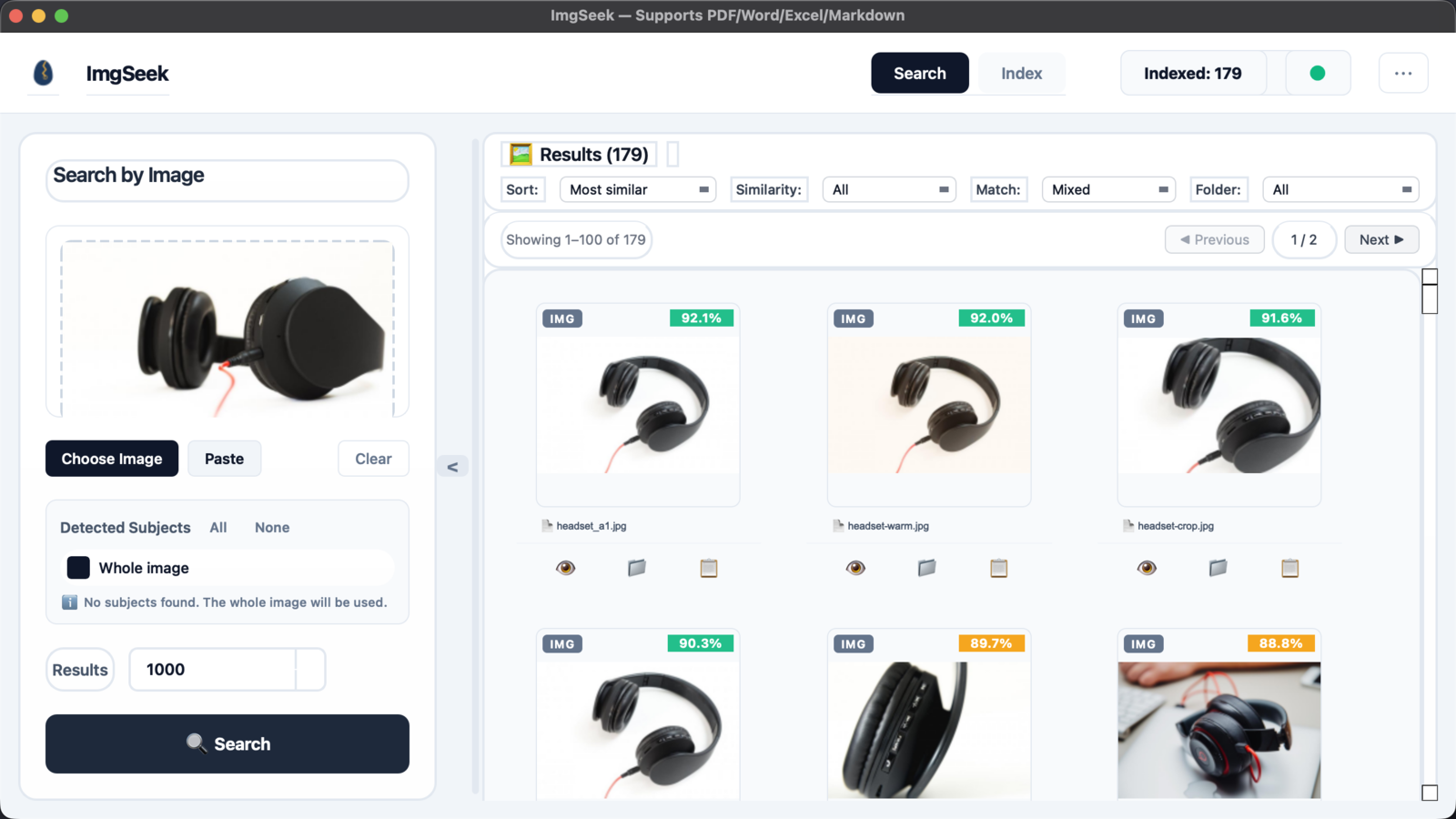
- ImgSeek covers a narrower case. You have one picture and want every photo of the same subject across many folders, including pictures embedded in PDFs and slide decks. It costs $49 once, and one key covers two devices across Mac and Windows.
If your photos live in Apple Photos
Photos keeps its library in a package, and photos from an iPhone are usually HEIC. Photos itself, PhotoSweeper and Peakto read the library directly. dupeGuru, Czkawka, digiKam and ImgSeek work on ordinary folders. For those, export the photos first with File → Export in Photos.
A note on apps from outside the App Store
macOS blocks the first launch of apps that Apple hasn't notarized. dupeGuru's release notes say its Mac build is signed "not with a paid developer subscription". ImgSeek's Mac build isn't notarized yet either, so the first launch needs a manual approval; the download page walks through it. App Store apps such as PhotoSweeper don't have this step. Some company-managed Macs don't allow the approval at all.
When not to use ImgSeek
- You want to clear out duplicates, bursts or edits — Photos' Duplicates, PhotoSweeper, Gemini 2, dupeGuru or Czkawka do this better. Several of them are free.
- Your library is mostly HEIC or RAW — ImgSeek can't read either format.
- You want to stay inside Photos or Lightroom — PhotoSweeper and Peakto work with those libraries directly. ImgSeek only sees folders.
- You want a catalogue with tags, albums and faces — choose Peakto, Excire Foto or digiKam. ImgSeek only searches.
- You have an Intel Mac — the Mac build is Apple Silicon only and won't install.
- You won't run closed-source or unnotarized software — ImgSeek is both, for now.
- You want to search for one kind of object the detector doesn't recognise — subject detection only covers common object types, so it won't single out headphones or a specific product part. Whole-image search still finds them.
A sensible order to try things
- Start with what's free. Open Photos → Duplicates for your library, and run dupeGuru or Czkawka over your folders. If copies were the problem, you're done.
- If bursts and edits are the problem, try PhotoSweeper. The developer offers a trial on its website, and on the App Store it is a one-off $14.99.
- If you need the same subject in different photos, try digiKam's Find similar first; it costs nothing. If it misses photos that were taken again from another angle, trial the paid tools on your own pictures: Peakto (7 days), Excire Foto, or ImgSeek (14 days, no card). Results vary a lot between photo collections, so test on your own.
Frequently asked questions
- Can Apple Photos find similar photos?
- Photos finds duplicates automatically and lists them under Utilities, Duplicates, where you can merge them; this is available from macOS Ventura. Its search works from words, dates, text in photos, and plain-language descriptions with Apple Intelligence. It has no command that takes one photo and returns other photos that look like it.
- Can Spotlight or Finder search by image?
- No. Spotlight and Finder search file names, document text and tags. Neither compares pictures, so finding visually similar images needs a separate app.
- What is the best free way to find similar images on a Mac?
- For copies of the same image, use the Duplicates collection in Photos for your library, and dupeGuru or Czkawka for folders. For a find-similar search that starts from one picture, digiKam is free and open source, though its fingerprints follow overall colour and layout more than the subject itself.
- Do these tools upload my photos?
- Photos' duplicate detection, dupeGuru, Czkawka and digiKam all run on the Mac. Peakto and Excire state that their AI analysis runs locally. ImgSeek indexes and searches entirely on your computer and never uploads images or its index; it only goes online to activate a license and to check for updates by reading a small version file. For any other tool, check the vendor's privacy policy.
- Does ImgSeek work on an Intel Mac?
- No. The Mac build supports Apple Silicon only and will not install on an Intel Mac. ImgSeek also runs on Windows 10 and 11, and one license covers two devices across Mac and Windows.
- Why doesn't ImgSeek show my iPhone photos?
- iPhone photos are usually saved as HEIC, and ImgSeek does not read HEIC or RAW files. It indexes JPEG, PNG, WebP, BMP, GIF and TIFF. Export the photos as JPEG from Photos first, or use a tool that reads HEIC natively, such as PhotoSweeper or Excire Foto.