Reverse image search on your own computer: 7 offline tools compared
10 min read
Google Lens and TinEye search the web, not your disk. To search your own files by image, offline, you need a desktop tool, and the free ones are good. dupeGuru and Czkawka find copies and near-copies, and digiKam adds find-similar and search-by-sketch on top of a full photo manager.
The paid tools are worth it only if you need to match by content, meaning the same subject in a different photograph. Excire Foto ($249 one-time, Mac and Windows) and Peakto (Mac only, from $15 a month) come with a full photo catalogue. ImgSeek ($49 one-time, Mac and Windows) does search only, and it is the one that also looks inside PDF and Office files.
The seven tools at a glance
| Tool | How it matches | Copies | Same subject, different photo | Images inside PDF / Office | Photo management | Platforms | Price |
|---|---|---|---|---|---|---|---|
| digiKam 9.1 | Wavelet fingerprints | ✅ | ⚠️ Follows colour and layout | — | ✅ Full | Mac, Windows, Linux | Free, open source |
| dupeGuru 4.3.1 | 15×15 grid of average colours, or EXIF date | ✅ | ❌ | ❌ | ❌ | Mac, Windows, Linux | Free, open source |
| Czkawka / Krokiet 12.0 | Image hashes; mirrored and rotated copies too | ✅ | ❌ | ❌ | ❌ | Mac, Windows, Linux | Free, open source |
| Apple Photos | Not documented | ✅ Duplicates collection | ❌ | ❌ | ✅ Full | Mac | Built in |
| Excire Foto 2027 | AI, runs locally | — | ✅ Find Similar Photos | — | ✅ Full | Mac, Windows | $249 one-time |
| Peakto | AI, runs locally | — | ✅ Search with a reference image | — | ✅ Full, across Photos, Lightroom, Capture One and folders | Mac | $15/month, or $270 one-time (Standard) |
| ImgSeek | Neural-network embeddings (DINOv2); subject detection for common object types | ⚠️ Capable, not its focus | ✅ | ✅ PDF, .docx, .pptx, .xlsx, .xls | ❌ Search only | Mac (Apple Silicon only), Windows 10/11 | $49 one-time, 2 devices |
"—" means the vendor doesn't document it. US prices, checked 3 October 2026. Sources: digiKam download and similarity docs · dupeGuru releases and scan docs · Czkawka and releases · Apple Photos · Excire Foto, tutorials and store · Peakto and pricing.
Pick by what you are trying to do
| You want to… | Start with |
|---|---|
| Free up space taken by duplicate copies | dupeGuru or Czkawka for folders; Photos' Duplicates for a Photos library |
| Organise a photo library and find similar shots inside it | digiKam (free), Excire Foto or Peakto |
| Find every photo of the same subject across many folders | Try digiKam's Find similar first; then Excire Foto, Peakto or ImgSeek |
| Find which PDF, Word, PowerPoint or Excel file contains a picture | ImgSeek, or the free extract-and-compare method for a few files |
| Work on Linux | digiKam, dupeGuru or Czkawka |
Why "how it matches" decides everything
Fingerprint and hash tools reduce each image to a compact summary of its pixels. They are quick, and they recognise the same image after resizing, recompression or a watermark, but a photo taken again from another angle produces a different summary and won't be paired. AI tools run a neural network over each image and compare descriptions of what it shows. That can match across viewpoint and lighting, at the cost of much heavier indexing and a ranked shortlist that someone has to review. The full explanation, including why lowering a similarity threshold doesn't turn one into the other, is in duplicate finders vs. semantic search.
Each tool, and where it beats ImgSeek
digiKam: free, complete, and the place to start
digiKam is a full open-source photo manager whose Similarity view offers find duplicates, find similar and find by sketch. Its fingerprints use a wavelet method from "Fast Multi-Resolution Image Querying", designed for sketches and low-resolution queries, so matches follow overall colour and layout more than the subject itself. Its documentation warns that building fingerprints "may take hours" on a large collection. Better than ImgSeek at: price (free), Linux and Intel Mac support, and everything to do with organising photos.
dupeGuru: simple duplicate cleanup
dupeGuru's Picture mode splits each image into a 15×15 grid of average colours and compares the grids; its own documentation calls the method "very naive". It is clear and predictable for copies of the same image. The last release, 4.3.1, came out in July 2022, and its Mac build is signed "not with a paid developer subscription". Better than ImgSeek at: free cleanup of copies, Linux support, and transparency (it's open source).
Czkawka / Krokiet: the actively maintained free option
Czkawka finds similar images by hashing them. Its README describes matches as images that "are not exactly the same (different resolution, watermarks)", and since version 12.0 it also matches mirrored, flipped and rotated copies. Krokiet is now its main interface; the older GTK app has had its last release. HEIC and RAW support are optional build features that aren't included in the Windows prebuilt binaries. Better than ImgSeek at: price, Linux, and plain duplicate cleanup.
Apple Photos: already on your Mac
Photos finds duplicates in its own library automatically (Utilities → Duplicates) and merges them. Its search starts from words, dates, text in photos, or a description with Apple Intelligence; there is no search that starts from an example picture. Better than ImgSeek at: zero setup, HEIC, and anything already inside your Photos library.
Excire Foto: an AI photo catalogue, Mac and Windows
Excire Foto 2027 is a photo-management app whose AI runs on your computer. It searches by subject, people, faces and text in images, and has a Find Similar Photos function. It supports RAW and HEIC, and one license covers Mac and Windows. Better than ImgSeek at: cataloguing, keywording and culling, and RAW and HEIC support.
Peakto: one search across all your Mac photo libraries
Peakto indexes Apple Photos, Lightroom, Capture One and plain folders into one interface without moving files, with AI that runs locally. It can "search for similar assets" from a reference image. It's Mac only, sold as a subscription from $15 a month, or as a $270 Standard lifetime license with updates included for the first year. Better than ImgSeek at: working across existing photo libraries, video, and team sharing on its Professional plan.
ImgSeek: search only, including inside documents
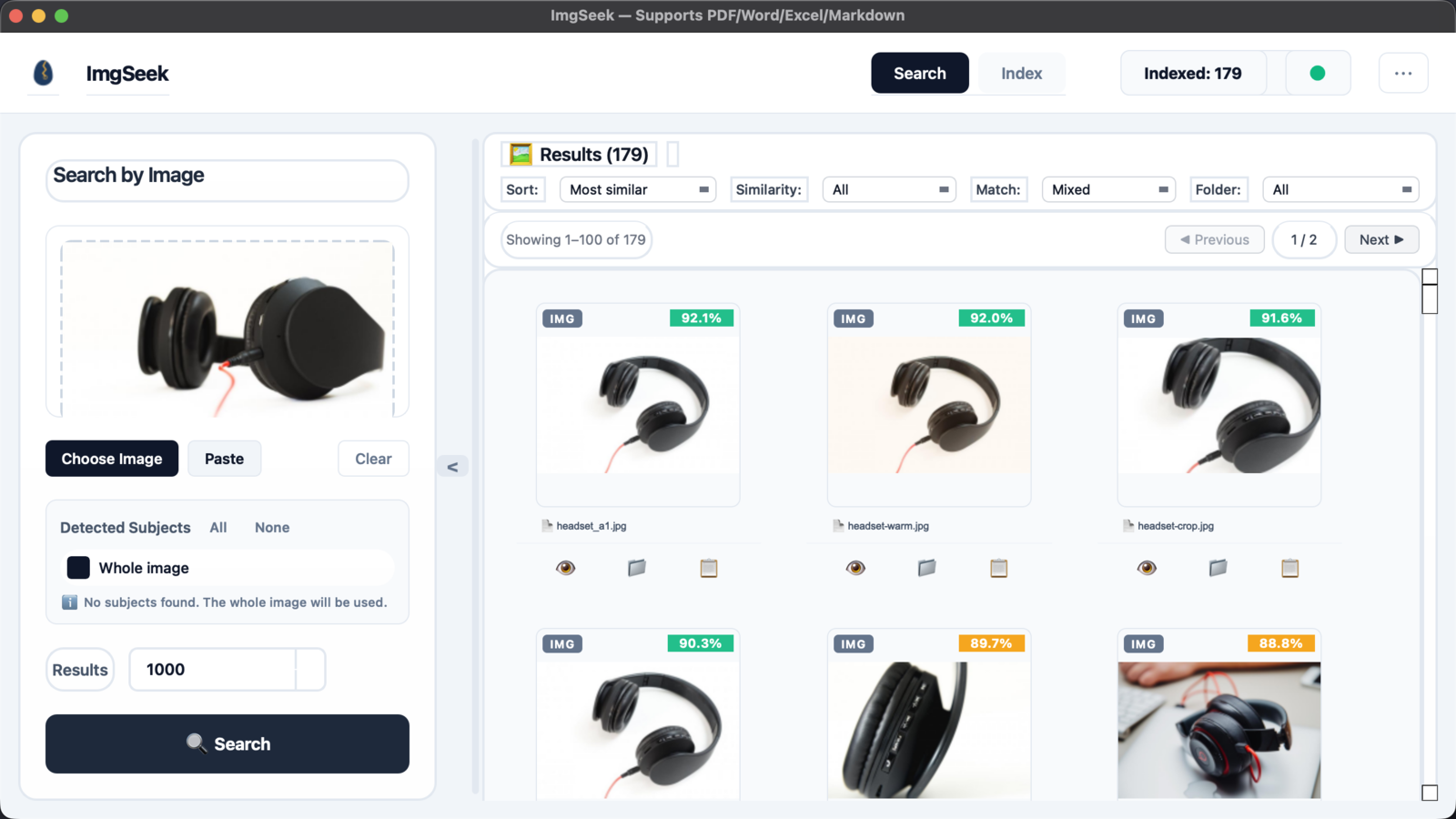
ImgSeek indexes folders in place and searches them by example image. It uses DINOv2 neural-network embeddings. For common object types, such as chairs, cups or clocks, it detects the main subject of your query so that backgrounds matter less; for anything else, headphones included, it searches with the whole image. It also indexes images embedded in PDF, Word (.docx), PowerPoint (.pptx) and Excel (.xlsx, .xls) files, and tells you the page or slide each match came from. It costs $49 once, and one key covers two devices across Mac and Windows.
Where ImgSeek falls short
- No Intel Mac support — the Mac build is Apple Silicon only.
- No HEIC or RAW — it reads JPEG, PNG, WebP, BMP, GIF and TIFF. iPhone photos need exporting as JPEG first.
- Not notarized by Apple yet — the first launch on a Mac needs a manual approval (steps), which some managed Macs don't allow.
- Closed source — unlike digiKam, dupeGuru and Czkawka.
- Slower on Windows — the Windows build runs on the CPU only, so the first indexing pass over a large library is noticeably slower than on an Apple Silicon Mac.
- No photo management — no albums, tags, ratings or faces. Next to digiKam, Excire Foto, Peakto or Photos, it is just a search box.
- No Linux build.
- Subject detection only knows common object types — headphones or a specific product part won't be singled out of a busy photo. Whole-image search still works for them.
- New, with few users so far — there are no independent reviews to lean on yet. Use the trial to judge it on your own files.
Frequently asked questions
- Is there an offline version of Google Lens?
- Not from Google. Google Lens and TinEye search the public web and need the image sent to their servers. To search your own files offline you need a desktop tool: dupeGuru, Czkawka and digiKam are free, while Excire Foto, Peakto and ImgSeek are paid and match by content with AI that runs on your computer.
- Are free tools good enough for reverse image search on my own files?
- For copies of the same image, resized, recompressed or watermarked, yes: dupeGuru and Czkawka do this well and cost nothing. For the same subject in a different photograph, hash and fingerprint tools generally do not pair the images. Try digiKam's Find similar on your own photos before paying for anything.
- Which tool is fastest?
- We have not benchmarked these tools against each other, so this answer gives no numbers. As a rule, hash and fingerprint tools build their index much faster than AI tools, which run a neural network on every image. dupeGuru's documentation notes that its fuzzy picture comparison compares every picture with every other one. ImgSeek indexes a folder once and afterwards processes only new and changed files.
- Do any of these tools upload my photos?
- digiKam, dupeGuru, Czkawka and Photos' duplicate detection run on your computer. Excire and Peakto state that their AI analysis runs locally. ImgSeek indexes and searches entirely on your computer and never uploads images or its index; it only goes online to activate a license and to check for updates by reading a small version file.
- Which of these work on Linux?
- digiKam, dupeGuru and Czkawka. Excire Foto and ImgSeek run on Mac and Windows, and Peakto and Apple Photos are Mac only.
- Can any of them find a picture inside a PDF or PowerPoint file?
- ImgSeek indexes images embedded in PDF, Word, PowerPoint and Excel files and reports the page or slide of each match. None of the other six documents this. For a few files you can do it free by extracting the images, by unzipping Office files or running pdfimages on PDFs, and then scanning them with dupeGuru or digiKam.